Animated snapshots
Available since happo v6.15.0. Options marked below as v6.18.0 need that version or later.
Happo normally freezes animations and takes a single screenshot. With animate, it can instead step an animation through a series of explicit times, take a screenshot at each one, and store the frames as a single animated PNG (APNG). Reviewers can then see how something moves, not just where it ends up, and a change to the motion shows up as a diff.
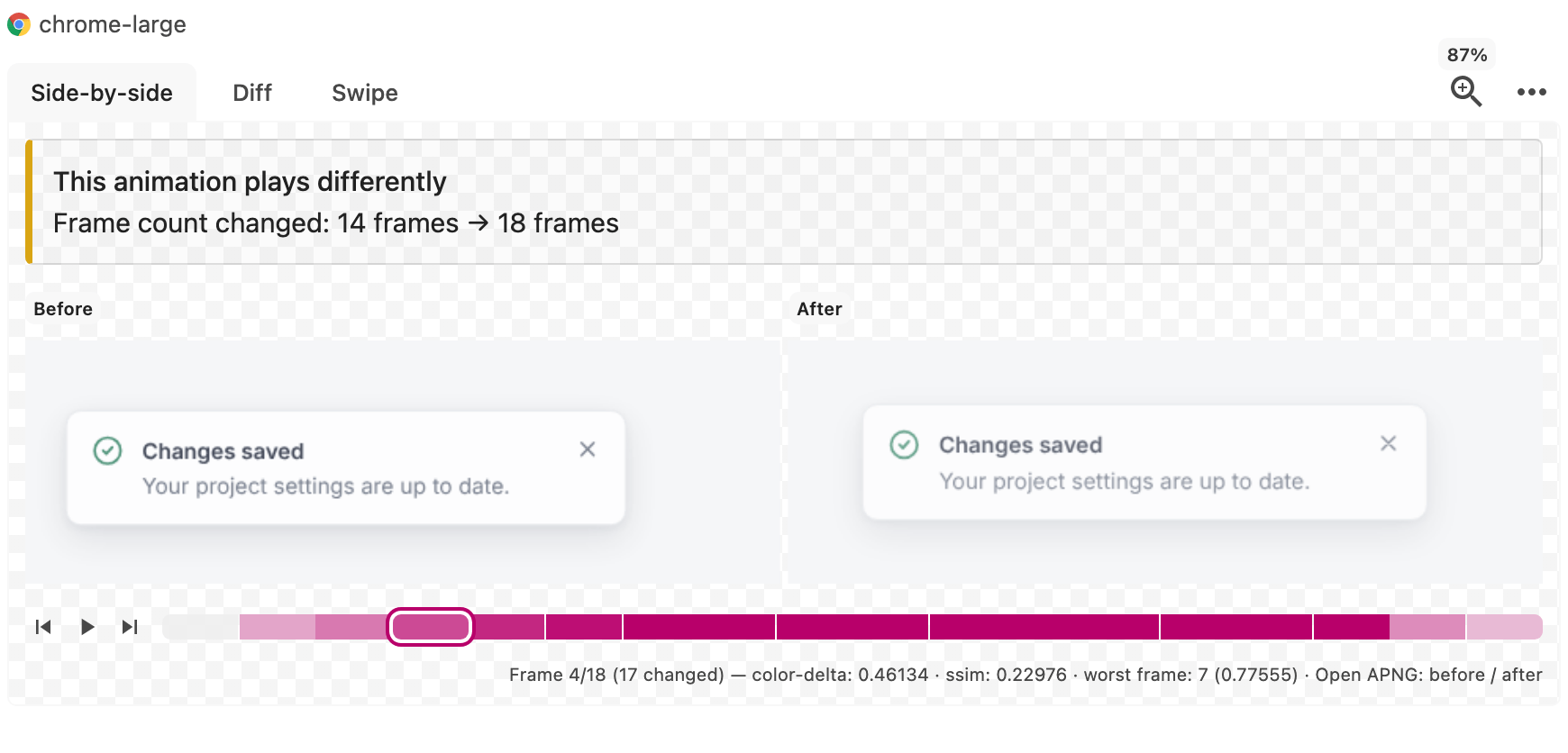
An animated snapshot is also a valid plain PNG: its first frame is the default image, so anything that doesn't understand APNG sees the first frame and treats it like any other snapshot. In the Happo report you can scrub through the frames of a diff, with the frames that changed the most highlighted.
Quick start
Turn it on for a target:
import { defineConfig } from 'happo';

export default defineConfig({
  targets: {
    chrome: {
      type: 'chrome',
      viewport: '1024x768',
      animate: {
        mode: 'auto',
        prefersReducedMotion: false,
      },
    },
  },
});
mode: 'auto' captures an animated snapshot only when the page has an animation Happo can drive, and takes an ordinary still image of everything else. That makes it safe to enable for a whole target: static stories cost nothing extra.
prefersReducedMotion: false is there because targets prefer reduced motion by default, and components that respect that preference turn their animations off, which would leave nothing to capture. It applies only to animated captures; every other snapshot still renders under the target's setting. Leave it out if you want to capture the reduced-motion version instead. See prefersReducedMotion.
Most animations need nothing more. The rest of this page covers the ones that do: transitions that need to be triggered, animations that start late or start one another, pages that turn their own animations off, and animations that don't use the browser's animation APIs at all (such as Lottie).
What can be captured
| Kind | Captured |
|---|---|
CSS animations (@keyframes) | Yes |
| CSS transitions | Yes, when something starts them. See trigger |
element.animate() (Web Animations API) | Yes |
SVG SMIL animations (<animate>, <animateTransform>…) | Yes |
requestAnimationFrame loops | Yes, with the virtual clock |
| Lottie, canvas engines, anything with its own frame loop | Yes, with a driver |
<video> | Yes, with the built-in video driver |
| Animated GIFs | No. They're shown on their first frame, as in any Happo snapshot |
| Animated WebP and APNG images | No. Happo doesn't control them, so replace them with a still image |
Scroll-driven animations (ScrollTimeline, ViewTimeline) | Yes, but only with scrollTimelines: 'seek'. Their progress is scroll position, not time |
| View transitions | Not yet |
Happo drives animations by seeking: it pauses each one and asks it to render at an exact time, rather than letting it play and taking screenshots as it goes. That's what makes the same animation produce the same frames on every run.
Animated images are the exception. Happo freezes animated GIFs on their first frame whether or not animate is on, but it has no way to pause or step an animated WebP or APNG <img>: it keeps playing on its own, and can be caught on a different frame each run. If your stories use one, swap it for a still image in the story.
Where to configure it
animate can be set on a target, and then per Storybook story, per example in the custom integration, or per page in the pages integration. Per-story, per-example and per-page options merge over the target's, one field at a time (see how options merge below).
On a target
export default defineConfig({
  targets: {
    chrome: {
      type: 'chrome',
      viewport: '1024x768',
      animate: { mode: 'auto', fps: 12 },
    },
  },
});
Target-level animate is the only option for the Cypress and Playwright integrations.
On a Storybook story
export const Opening = {
  parameters: {
    happo: {
      animate: { mode: 'always', duration: 800, fps: 12 },
    },
  },
};
A story that sets animate itself also renders in a motion environment, and can use hooks, which targets and other integrations can't.
In the custom integration
In the custom integration, pass animate with each example:
happoCustom.registerExample({
  component: 'Toast',
  variant: 'opening',
  render: () => {
    document.body.innerHTML = '<div class="toast is-open">Saved</div>';
  },
  animate: { mode: 'auto', fps: 12 },
});
On a page
In the pages integration, set animate on each page:
export default defineConfig({
  integration: {
    type: 'pages',
    pages: [{ url: 'https://example.com/', title: 'Home', animate: 'auto' }],
  },
});
How options merge
A story, example or page only needs to set what it wants to change. Each field it sets replaces the target's value for that field, and every other field keeps the target's value:
// On the target
animate: { mode: 'auto', fps: 15 }

// On one story
animate: { maxFrames: 60 }

// What that story is captured with
{ mode: 'auto', fps: 15, maxFrames: 60 }
animate: false on a story, example or page turns capture off for just that one.
Shorthands
| Shorthand | Means |
|---|---|
animate: 'auto' | { mode: 'auto' } |
animate: true | { mode: 'always' } |
animate: false | { mode: 'off' } |
Options
mode
Available since happo v6.15.0. Type: 'off' | 'auto' | 'always'. Default: 'off'.
'off'takes a still image.'auto'captures an animated snapshot when the page has an animation Happo can drive, and a still image otherwise. SMIL animations and stories on the virtual clock are captured too, even though neither can report its length.'always'captures even when nothing on the page reports how long it runs.
duration
Available since happo v6.15.0. Type: number | 'auto'. Default: 'auto'.
The capture window, in milliseconds. 'auto' takes it from the animations on the page: the longest one wins.
Leave it at 'auto' whenever the page can report the length, since a hand-set duration goes stale when the animation changes. Set it for SMIL, requestAnimationFrame loops and long videos, which can't report a useful length (the window would otherwise be maxDuration).
When you do set it, take the value from the component so the two can't drift apart:
export const ENTER_DURATION_MS = 300;

export function Toast({ children }) {
  return (
    <div style={{ animation: `toast-enter ${ENTER_DURATION_MS}ms ease-out` }}>
      {children}
    </div>
  );
}
import { Toast, ENTER_DURATION_MS } from './Toast';

export const Entering = {
  render: () => <Toast>Saved</Toast>,
  parameters: {
    happo: { animate: { mode: 'always', duration: ENTER_DURATION_MS } },
  },
};
maxDuration
Available since happo v6.15.0. Type: number. Default: 4000.
The ceiling for every capture window, whether you set duration or not. It's also the window used when duration is 'auto' but nothing reports a length: SMIL, the virtual clock, and mode: 'always'.
Treat it as a safety net for long or infinite animations, not a target. Setting it below an animation's real length captures the beginning and stops.
fps
Available since happo v6.15.0. Type: number. Default: 10.
Samples per second of animation, from 1 to 60. Ignored when sampling isn't 'uniform'.
maxFrames
Available since happo v6.15.0. Type: number. Default: 24.
A hard cap on the number of frames, from 2 to 120. It wins over fps × duration, and keeps a high fps from turning into a hundred screenshots.
loop
Available since happo v6.15.0. Type: number. Default: 0.
How many times the APNG plays when viewed. 0 loops forever.
maxBytes
Available since happo v6.15.0. Type: number. Default: 4000000.
The size budget for the encoded file, in bytes. A capture that comes out bigger is handled like a failed expectation: by default the snapshot becomes an image saying how big the capture was, and onExpectationFailure can make it fail the job instead. This applies even when you haven't set expect.
Happo doesn't drop frames to make it fit, unless you set onExpectationFailure: 'warn'. The file size depends on the pixels, so a capture close to the budget can fit on one run and not the next, and dropping frames only on some runs would make every frame a diff. If a capture goes over, lower fps, shorten duration or set a root, so it ends up well below the budget.
clock
Available since happo v6.15.0. Type: 'off' | 'virtual'. Default: 'off'.
'virtual' replaces the page's clock so requestAnimationFrame animations can be stepped. It has to be armed on the target. See the virtual clock.
trigger
Available since happo v6.15.0. Type: AnimateTrigger | null. Default: null.
A CSS transition doesn't exist until the property it watches changes, so there's nothing to capture until something changes it. A trigger does that right before the capture starts:
export const Opening = {
  parameters: {
    happo: {
      animate: {
        trigger: { selector: '.toast', action: 'addClass', value: 'is-open' },
      },
    },
  },
};
Setting a trigger turns capturing on by itself, so you don't also need mode. It won't override a mode you set explicitly, including 'off'.
action | value | Notes |
|---|---|---|
addClass / removeClass | class name | |
setAttribute | { name, value } or a string | A bare string sets that attribute to "" |
removeAttribute | attribute name | |
click | none | Calls element.click(), so your click handlers run |
focus | none | |
hover | none | Moves a real pointer over the element, so :hover applies |
The selector is matched through shadow roots.
Trigger functions
Available since happo v6.18.0. Storybook stories only.
In a story, trigger can also be a function. It runs on the page with the story's root element:
export const Opening = {
  parameters: {
    happo: {
      animate: {
        mode: 'auto',
        trigger: async ({ rootElement }) => {
          rootElement.querySelector('button[aria-haspopup]').click();
        },
      },
    },
  },
};
Unlike a declarative trigger, a function doesn't turn capturing on by itself, so set mode. A story's trigger function replaces a declarative trigger set on the target.
prefersReducedMotion
Available since happo v6.16.0. Type: boolean | null. Default: null.
Targets prefer reduced motion by default (see the target's prefersReducedMotion), and a page that respects that preference usually turns its own animations off:
@media (prefers-reduced-motion: reduce) {
  .toast {
    animation: none;
  }
}
With that CSS in place there's nothing to capture, and the snapshot is a still image. That's the right result by default, since it's what the page shows, and the reduced-motion version is often worth a snapshot of its own.
To capture the full-motion version, set prefersReducedMotion: false on animate, for a whole target or for one story:
animate: { mode: 'auto', prefersReducedMotion: false }
This switches the preference for the animated capture only. Every other snapshot still renders under the target's own setting. It also works the other way: prefersReducedMotion: true forces reduced motion for one capture on a target that has it turned off. null uses the target's setting.
For a story that sets it, the override is applied before the story renders (since v6.18.0), so components that check the preference when they mount (e.g. with matchMedia) see it too.
discovery
Available since happo v6.18.0. Type: number | { settleMs, maxFrames }. Default: { settleMs: 0, maxFrames: 90 }.
Happo pauses every animation it finds when the capture starts. Anything that starts afterwards on its own, like the items of a staggered list mounted on timers after a click, or content that arrives after a fetch, isn't there yet and would be missed.
With discovery, Happo keeps looking for settleMs milliseconds after the capture starts, checking once per frame, and takes over each new animation as it appears:
export const Appearing = {
  parameters: {
    happo: {
      animate: {
        trigger: { selector: '#search', action: 'click' },
        discovery: { settleMs: 600 },
      },
    },
  },
};
| Field | Default | Meaning |
|---|---|---|
settleMs | 0 | How long to keep looking, in ms (up to 10000). 0 looks only once |
maxFrames | 90 | The most checks (one per frame) the search may take |
settleMs is a fixed limit counted from the start of the capture. Finding something new doesn't extend it, so make it long enough to cover the last animation you expect. discovery: 600 is short for { settleMs: 600 }.
An animation found late keeps its place in time: it starts in the capture at the moment it appeared, so a stagger stays a stagger. Until then it shows its first keyframe.
That moment is measured, so it depends on when the page's timers fired. A setTimeout of 100 ms can fire at 101 ms on one run and 118 ms on the next. Happo rounds start times to whole frames, but a start that lands near a frame boundary still rounds one way on one run and the other way on the next. From then on every frame shows the element a step apart, which can add up to a diff even though nothing changed.
To avoid that, declare when each animation starts with data-happo-start-ms, in milliseconds from the start of the capture (or of its stage). Put it on the animating element or on any ancestor, and Happo uses it instead of measuring:
{
  results.map((result, index) => (
    <li key={result.id} data-happo-start-ms={index * 150}>
      <ResultCard result={result} />
    </li>
  ));
}
Better still, if you can, stagger with CSS animation-delay or transition-delay on elements that are all mounted at once. Happo finds those animations as soon as the capture starts, and the delays are part of their timing, so you don't need discovery at all.
Start times that Happo had to measure are marked measured: true in the trace, and called out in the run log, so you can tell which ones to declare.
stages
Available since happo v6.18.0. Type: number | { max, waitMs }. Default: { max: 1, waitMs: 1000 }.
Some animations are a sequence where each step starts the next: a panel slides in, then a list staggers in, and then a Lottie plays. The next step usually only exists once the previous one finishes, because the previous one's completion handler mounts it. So it can't be found up front.
stages captures them one at a time:
export const Welcome = {
  parameters: {
    happo: {
      animate: {
        mode: 'auto',
        stages: 4,
        expect: { minStages: 2 },
      },
    },
  },
};
Happo captures the current stage, then lets it finish so its finished promises, animationend handlers and the like run. Whatever animations appear next become the next stage. All stages go into one APNG, each sampled from its own start, so the same chain produces the same frames on every run.
stages is a single object (or a number, as a shorthand for max):
| Field | Default | Meaning |
|---|---|---|
max | 1 | The most stages to capture (up to 16). 1 means no staging |
waitMs | 1000 | How long to wait for the next stage to appear, in ms |
The capture stops at the first of:
maxstages;- nothing new appearing within
waitMs; - everything new looking like something already captured (the same kind of animation on the same element, with the same name and length), which is a chain that restarts itself rather than moving on.
One new animation is enough for a stage to count. Any repeats are captured along with it. A list that moves on to its next item, for example, usually re-runs the same enter and leave fades next to the animation that is new.
If everything that appears first is a repeat, Happo keeps looking for something new until waitMs is up. Repeats are paused as soon as they're found, though. So a step your page only starts once a repeat has ended is never reached, and the capture stops there.
A chain that never gets past its first stage still produces a plausible animation of that stage, so pair stages with expect: { minStages }. When that expectation fails, the failure says why the chain stopped. If it stopped on repeats, it lists them.
Things to know:
- A stage's elements have to stay mounted while it's being captured. An element removed when its step ends is fine; one removed partway through has nothing left to show.
- Infinite animations never finish, so they don't start the next stage.
- Stages can't be combined with the virtual clock. With
clock: 'virtual', only the first stage is captured, with a warning. - A driver can decide how its animations finish a stage, with a
finish()on its handles. See finishing a stage.
sampling
Available since happo v6.18.0. Type: 'uniform' | Array<{ stop, frames }> | { times }. Default: 'uniform'.
By default frames are spread evenly across the window at fps. That wastes frames on springs and overshoots, which do all their moving early and then hold still. Two alternatives:
// 7 frames across the first half of the window, 3 across the rest
animate: {
  sampling: [
    { stop: 0.5, frames: 7 },
    { stop: 1, frames: 3 },
  ],
}

// exactly these times, in milliseconds
animate: { sampling: { times: [0, 80, 160, 240, 400, 800] } }
| Form | Meaning |
|---|---|
'uniform' | Evenly, at fps |
Array<{ stop, frames }> | frames frames across the stretch of the window ending at stop, a fraction of it. The last stop is the end of the window |
{ times } | Exactly these times, in milliseconds. The end state is included only if you list it |
A list of stops works like the colour stops of a linear-gradient. Each entry spends its frames on the stretch ending at its stop, so the example above puts seven frames in the first 500 ms of a one-second window and three in the last 500 ms. Stops have to climb, frames defaults to 1, and the last stop is treated as the end of the window however you write it, so a capture always finishes on the end state.
Use as many stops as the animation has interesting stretches. A card that flies in, pauses, and then settles wants three:
animate: {
  duration: 1200,
  sampling: [
    { stop: 0.3, frames: 8 }, // the flight in: 8 frames over 360 ms
    { stop: 0.6, frames: 1 }, // the pause: one frame is enough
    { stop: 1, frames: 6 }, // the settle: 6 frames over the last 480 ms
  ],
}
Both alternatives ignore fps. maxFrames still applies: stops asking for more frames between them are scaled down in proportion, stops past the frame budget are dropped, and extra times are dropped.
However the frames are spread, the APNG plays at the animation's real speed: each frame stays on screen until the time of the next sample. Uneven sampling makes playback smoother in some stretches and choppier in others, never faster or slower.
root
Available since happo v6.18.0. Type: string | null. Default: null.
A CSS selector (matched through shadow roots) that limits which animations are captured. Only the animations inside it are captured, and only they decide the capture window.
Say a story renders a page shell with a spinner in its header, and you want to capture the notification panel sliding in, not the spinner:
export const PanelOpening = {
  render: () => (
    <AppShell>
      <NotificationPanel open />
    </AppShell>
  ),
  parameters: {
    happo: {
      animate: { mode: 'auto', root: '[data-testid="notification-panel"]' },
    },
  },
};
The panel's animation decides the window and is stepped through it. The spinner is outside root, so it's held on its first frame in every frame, as it would be in a still image. The snapshot itself still shows the whole story: root limits the animations, not the image. If root matches nothing, nothing is captured and you get a still image.
expect and onExpectationFailure
Available since happo v6.18.0. expect: an object, or null (the default). onExpectationFailure: 'image' | 'fail' | 'warn', default 'image'.
A capture that finds nothing falls back to a still image. That's what makes mode: 'auto' safe across a whole target, but it's not what you want for a story that exists to show an animation: if the animation breaks, the snapshot becomes a perfectly plausible still image and nothing fails.
expect says what the capture has to find:
animate: {
  mode: 'auto',
  expect: { minAnimations: 1, minFrames: 3 },
}
| Check | Meaning |
|---|---|
minAnimations | At least this many animations found (SVG SMIL roots count) |
minFrames | At least this many distinct frames in the APNG |
triggered | true requires the trigger to have matched an element |
minStages | At least this many stages captured |
drivers | At least this many animations per driver, e.g. { lottie: 1 } |
When a check fails, or a capture is over maxBytes, onExpectationFailure decides what happens:
'image'(default): the snapshot is replaced with an image describing the failure, listing what was expected and every animation that was found. It shows up in the report as a diff that explains itself.'fail': the job fails with that description as its error, like any other failure on the worker. You'll find the message in your Happo dashboard under "Snap-requests".'warn': Happo logs a warning with the description and keeps the capture. A capture overmaxByteshas every other frame dropped, repeatedly, until it fits.
expect merges one field at a time like the rest of animate. A common pattern is to set checks on the target and let the occasional deliberately-still story opt out with expect: null.
drivers
Available since happo v6.18.0. Type: string[] | null. Default: null.
Which drivers to use. null uses every driver you registered. Naming one is also how you turn on a built-in driver, like video.
scrollTimelines
Available since happo v6.23.0. Type: 'off' | 'seek'. Default: 'off'.
Scroll-driven animations (animation-timeline: scroll() or view()) move with the scroll position, not with time. By default Happo leaves them alone, so every frame shows them wherever the page's scroll position puts them. 'seek' plays them instead, as if the page scrolled past them at a steady speed.
Say a chart draws its line as it scrolls into view, then shows a callout once it's well inside the viewport:
@keyframes draw {
  from {
    clip-path: inset(0 100% 0 0);
  }

  to {
    clip-path: inset(0);
  }
}

@keyframes appear {
  from {
    opacity: 0;
    scale: 0.9;
  }
}

.plot {
  view-timeline-name: --chart;
}

.line {
  animation: draw linear both;
  animation-timeline: --chart;
  animation-range: entry 80% contain 25%;
}

.callout {
  animation: appear linear both;
  animation-timeline: --chart;
  animation-range: contain 22% contain 32%;
}
export const ScrollingIn = {
  parameters: {
    happo: {
      animate: {
        mode: 'auto',
        scrollTimelines: 'seek',
        duration: 1500,
        fps: 8,
      },
    },
  },
};
The capture draws the line, and the callout appears while the line is still finishing, just as it does when you scroll the page:
- The scroll takes
duration, or defaults to one second whendurationis'auto'. - It covers only the stretch where something animates: from the start of the earliest
animation-rangeon a scroller to the end of the latest. - Each
animation-rangekeeps its place along it. Animations on one scroller play in the order scrolling plays them, so a staggered row of cards that each reveal as they come into view stays staggered. Animations on different scrollers each get the whole window. - Nothing actually scrolls, and the snapshot frames the page as it is. A story too short to scroll works too: Happo works out where each range would be from the element's size and the viewport's, ignoring
view-timeline-inset. - Chrome, Edge and Safari run scroll-driven animations. Firefox's stable releases don't yet, so a Firefox target shows whatever your fallback styles do.
Animations outside root are left alone, as they are with 'off'.
setup and verify
Available since happo v6.18.0. Storybook stories only.
Functions that run on the page: setup before the story renders, verify after the capture. See hooks.
How to choose values
Start with animate: 'auto' and change nothing else. The defaults work for typical UI animations like toasts, menus and spinners, and most animations don't need tuning.
What it costs against your quota. An animated snapshot counts as three snapshots, however many frames it ends up holding. A story that comes out as a still image (nothing animated, or mode: 'auto' found nothing to drive) counts as one, the same as any other snapshot.
Frame count drives the run time. Every frame is a full screenshot, so a 24-frame snapshot takes roughly 24 times as long to capture as a still screenshot. Run time and the time reviewers wait for a report both grow with it. Frame count also widens the diff surface: any frame that renders a pixel differently makes the whole snapshot a diff.
File size tends to stay small, because only the part of each frame that changed is stored. In one measurement, twelve frames of an element moving across a 1280×900 page came to about 36 KB, against 25 KB for a still screenshot of the same page. maxBytes caps it either way.
fps: use the lowest rate that still reads as motion. For most UI animation (a toast sliding in, a spinner, a progress bar) 8–12 is plenty.duration: leave it at'auto'unless the page can't report a length.maxDuration: a safety net, not a target.maxFrames: leave it alone unless one animation really needs more.
If an animation is too long to capture in full at a useful frame rate, decide which part of it matters most and spend your frames there. Shorten duration to cover just that part, or use sampling to put more frames in that stretch and fewer everywhere else.
A looping animation (animation-iteration-count: infinite) is captured across exactly one iteration, so the APNG loops without a stutter. A one-shot animation is captured including its end state.
The virtual clock
An animation driven by requestAnimationFrame has no timeline to seek: its state lives in whatever its frame callback changes. clock: 'virtual' replaces the page's clock (Date, performance.now(), requestAnimationFrame and timers), pauses it, and moves it forward one frame at a time.
The clock has to be in place before the page loads, so it's armed on the target. Each story then decides whether it captures:
export default defineConfig({
  targets: {
    chrome: {
      type: 'chrome',
      viewport: '1024x768',
      animate: { clock: 'virtual' },
    },
  },
});
export const Filling = {
  parameters: {
    happo: { animate: { mode: 'always', duration: 2000, fps: 10 } },
  },
};
- A
requestAnimationFrameloop can't report its length, so the window isdurationif you set it andmaxDurationotherwise. Setduration. - A story asking for
clock: 'virtual'on a target that didn't arm it gets a warning, and the capture falls back to seeking. - The virtual clock costs a little more than seeking, which is why it's opt-in.
- It has no effect in the Cypress and Playwright integrations, whose snapshots don't run scripts.
- It can't be combined with
stages.
Mixing clock-driven and CSS animations
One target can serve both. While the clock steps a story's requestAnimationFrame loop, its CSS animations, transitions and element.animate() animations are still seeked to each frame's time. So a story with both kinds is captured in step, and a story with only CSS animations works too: it just goes through the clock's capture path, which captures the whole page and crops afterwards.
Two things to keep in mind:
- Arm the clock with capture off on the target (
animate: { clock: 'virtual' }, as above) and turn capture on per story. If the target also setsmode: 'auto', every story gets a window ofmaxDuration, because the clock counts as something to drive. Static stories still come out as still images, but only after being captured frame by frame. - A story that only needs seeking can set
clock: 'off', forstagesor to skip the wider capture. The clock stays armed on the page; that story just doesn't use it.
The motion environment
Available since happo v6.18.0. Storybook stories only.
Some things are decided before a story has finished rendering, which is too late for anything done afterwards:
- a component that checks
prefers-reduced-motionwhen it mounts has already decided not to animate; - a test setup that makes
element.animate()zero-duration (to keep still images still) has already made every animation zero-duration; - a global rule that turns animations off has already stopped the transitions the story starts as it mounts.
So a Storybook story that sets animate in its own parameters renders in a motion environment, which is set up right before the story renders and undone after its screenshot:
<html>gets adata-happo-animateattribute.- Happo's own animation-freezing CSS (the CSS behind
freezeAnimations) steps aside, so transitions stay alive. - The story's
prefersReducedMotionoverride is applied. - The story's
setuphook runs.
If your Storybook setup turns animations off for Happo, scope that rule so animated stories are left alone:
html:not([data-happo-animate]) * {
  animation: none !important;
  transition: none !important;
}
Only stories get a motion environment. Setting animate on a target doesn't change how stories render.
Hooks
Available since happo v6.18.0. Storybook stories only.
A story's animate can include functions. They run on the page, next to your story, and Happo calls into them during the capture:
export const Celebrating = {
  parameters: {
    happo: {
      animate: {
        mode: 'auto',

        // Runs right before the story renders. Return a function to undo it
        // after the screenshot.
        setup: ({ rootElement }) => {
          restoreRealAnimate();
          return () => shimAnimateAgain();
        },

        // Instead of a declarative trigger.
        trigger: async ({ rootElement }) => {
          rootElement.querySelector('button').click();
        },

        // Runs after the capture. Throw to fail it, the way
        // `onExpectationFailure` says.
        verify: (trace) => {
          if (trace.animationCount < 2) {
            throw new Error('the follow-up animation never started');
          }
        },
      },
    },
  },
};
| Hook | Called | With | Returns |
|---|---|---|---|
setup | Right before the story renders | { rootElement } | Optionally a cleanup function (may be async) |
trigger | When the capture starts | { rootElement } | Nothing (may be async) |
verify | After the capture | the trace below | Nothing; throw to fail the capture |
A setup hook that throws is reported like a failed verify: the story didn't get the environment it asked for.
The trace verify receives:
| Field | Meaning |
|---|---|
animationCount | Animations found, including those found by drivers |
svgCount | SVG roots with SMIL animations |
driverCounts | Animations found per driver, e.g. { lottie: 2 } |
animations | Up to 20 of them, each { kind, name, target, startMs, endMs }, plus measured: true when the start was measured |
durationMs | The capture window, in ms |
frameTimes | The times sampled, in ms |
frameCount | Distinct frames in the APNG |
stageCount | Stages captured |
stages | An array with one entry per stage, each { animationCount, durationMs, animations } |
stopped | Why a capture in stages didn't take another one: { reason }, where reason is 'max', 'nothing' (nothing started within waitMs), 'rootRemoved' (the root left the page) or 'repeat'. A 'repeat' also has the stage that was turned down. null without stages |
Hooks are only available on stories. Target, example and page options are sent to Happo's browsers as plain data, which functions can't be part of.
Animation drivers
Available since happo v6.18.0.
Some animations never go through the browser's animation APIs. Anything that runs its own frame loop, like Lottie or a canvas-based engine, is invisible to Happo, so it can neither find nor seek it. A driver teaches it how.
Writing a driver
A driver has a name and a discover(root) function. discover returns a handle for each animation under root, and Happo seeks the handles alongside everything else, on the same timeline.
Register drivers in your Storybook preview:
import lottie from 'lottie-web';
import { registerAnimationDriver } from 'happo/storybook/register';

registerAnimationDriver({
  name: 'lottie',
  discover: (root) =>
    lottie
      .getRegisteredAnimations()
      .filter((animation) => root.contains(animation.wrapper))
      .map((animation) => ({
        target: animation,
        element: animation.wrapper,
        durationMs: (animation.totalFrames / animation.frameRate) * 1000,
        pause: () => animation.pause(),
        seek: (timeMs) => animation.goToAndStop(timeMs, false),
      })),
});
registerAnimationDriver does nothing outside a Happo run, so it's safe to leave in your preview. Outside Storybook (for example in the pages integration), register on the global instead: window.happoAnimate?.registerDriver({ ... }).
A handle has:
| Field | Required | Meaning |
|---|---|---|
seek(ms) | Yes | Render the animation at ms milliseconds. May return a promise, which Happo waits for |
durationMs | Yes | How long the animation runs, in ms. Counts toward the capture window like any other animation |
startMs | No | When the animation starts, in ms into the capture. Without it, a handle found during discovery starts when it was first seen |
target | Recommended | What the handle drives. discover can be called once per frame, and a handle whose target was seen before is the same animation found again |
pause() | No | Stop the animation moving on its own |
release() | No | Hand it back after the capture |
finish() | No | How to end it when a stage is done, firing its completion before it returns (or before its promise resolves). Without it, it's seeked to its end |
repeats | No | true for a loop, which is captured across one iteration |
name | No | Shown in the trace and in expectation failures |
element | No | The element it renders into; shown in the trace |
Guidelines:
- Return only what's under
root.rootis how a story limits the capture to part of the page, anddiscoveris also called on the whole page. - Make
seekrender synchronously if you can. If your renderer draws later (on a worker, on the next frame), return a promise that resolves once the frame is drawn, as in the worker example. - Don't start anything in
discover. It's called repeatedly and should only report what already exists. - Errors are contained. A driver that throws is logged and skipped, and the rest of the capture carries on.
Example: a custom frame loop
import { registerAnimationDriver } from 'happo/storybook/register';
import { activeEngines } from '../src/particles';

registerAnimationDriver({
  name: 'particles',
  discover: (root) =>
    activeEngines
      .filter((engine) => root.contains(engine.canvas))
      .map((engine) => ({
        target: engine,
        element: engine.canvas,
        durationMs: engine.duration,
        repeats: engine.loop,
        pause: () => engine.stop(),
        seek: (timeMs) => {
          engine.time = timeMs;
          engine.draw();
        },
      })),
});
Example: a renderer that draws asynchronously
seek: (timeMs) =>
  new Promise((resolve) => {
    renderer.renderAt(timeMs, resolve); // calls back once the frame is drawn
  }),
Example: a canvas drawn in a worker
An animation drawn on an OffscreenCanvas in a web worker keeps moving while the page is busy, and takes no time from it. That makes it a good fit for a loading indicator. Happo can't see into the worker, so give the page a handle that passes seek on as a message, and have the worker answer once the frame is drawn.
The page hands the canvas over and keeps a handle for each animation:
export const activeSparkles = new Set();

export function startSparkles(canvas) {
  const offscreen = canvas.transferControlToOffscreen();
  const worker = new Worker(new URL('./sparkles.worker.js', import.meta.url));
  worker.postMessage({ type: 'start', canvas: offscreen }, [offscreen]);

  let lastSeekId = 0;
  const seeks = new Map();
  worker.addEventListener('message', ({ data }) => {
    if (data.type === 'ready') {
      canvas.dataset.ready = '';
    }
    if (data.type === 'drawn') {
      seeks.get(data.seekId)?.();
      seeks.delete(data.seekId);
    }
  });

  const sparkles = {
    canvas,
    durationMs: 2000,
    pause: () => worker.postMessage({ type: 'pause' }),
    release: () => worker.postMessage({ type: 'play' }),
    seek: (timeMs) =>
      new Promise((resolve) => {
        lastSeekId += 1;
        seeks.set(lastSeekId, resolve);
        worker.postMessage({ type: 'seek', timeMs, seekId: lastSeekId });
      }),
    stop: () => {
      worker.terminate();
      activeSparkles.delete(sparkles);
    },
  };
  activeSparkles.add(sparkles);
  return sparkles;
}
The worker draws every frame from a time alone, and answers a seek once the frame has reached the screen:
const LOOP_MS = 2000;
const startedAt = performance.now();
let context = null;
let frame = 0;

// Not every browser has `requestAnimationFrame` in a worker.
const requestFrame =
  typeof requestAnimationFrame === 'function'
    ? requestAnimationFrame
    : (callback) => setTimeout(() => callback(performance.now()), 1000 / 60);
const cancelFrame =
  typeof cancelAnimationFrame === 'function'
    ? cancelAnimationFrame
    : clearTimeout;

// Everything on the canvas is a function of `timeMs`, and repeats every
// LOOP_MS.
function draw(timeMs) {
  const t = (timeMs % LOOP_MS) / LOOP_MS;
  // ... draw the frame at `t`
}

function play() {
  draw(performance.now() - startedAt);
  frame = requestFrame(play);
}

addEventListener('message', ({ data }) => {
  switch (data.type) {
    case 'start':
      context = data.canvas.getContext('2d');
      play();
      // An OffscreenCanvas shows what was drawn once the task that drew it
      // ends, so the page hears about it a frame later.
      requestFrame(() => postMessage({ type: 'ready' }));
      break;
    case 'pause':
      cancelFrame(frame);
      break;
    case 'play':
      cancelFrame(frame);
      play();
      break;
    case 'seek':
      draw(data.timeMs);
      requestFrame(() => postMessage({ type: 'drawn', seekId: data.seekId }));
      break;
  }
});
Then the driver, and stories that wait for the worker's first frame:
import { registerAnimationDriver } from 'happo/storybook/register';
import { activeSparkles } from '../src/sparkles';

registerAnimationDriver({
  name: 'sparkles',
  discover: (root) =>
    [...activeSparkles]
      .filter((sparkles) => root.contains(sparkles.canvas))
      .map((sparkles) => ({
        target: sparkles,
        element: sparkles.canvas,
        durationMs: sparkles.durationMs,
        repeats: true,
        pause: sparkles.pause,
        release: sparkles.release,
        seek: sparkles.seek,
      })),
});
export default {
  component: Sparkles,
  parameters: {
    // The worker draws a moment after the story renders.
    happo: { waitFor: () => document.querySelector('canvas[data-ready]') },
  },
};

export const Sparkling = {
  parameters: {
    happo: {
      animate: {
        mode: 'auto',
        fps: 8,
        expect: { drivers: { sparkles: 1 } },
      },
    },
  },
};
What makes it work:
seekwaits for the worker's answer, and the worker answers a frame late. A canvas drawn in a worker only shows what was drawn once the task that drew it ends, so an answer sent straight after drawing can arrive before the frame is on the screen.- The frame depends only on the time. Use a hash of each element's position or index rather than
Math.random(), and give everything the same loop length, sorepeats: truecaptures one iteration that joins up with itself.durationMs: 2000atfps: 8is 16 frames. pausestops the worker's own loop, so it can't draw over a frame Happo has just seeked to.releasestarts it again after the capture.- Still snapshots wait for the first frame. Without the
waitFor, a story could be captured before the worker has started. - No virtual clock is needed. The driver gives Happo the time directly, so it works on any target. If the animation stops under
prefers-reduced-motion, which Happo turns on by default, setprefersReducedMotion: falseon the story that captures the motion. requestAnimationFrameisn't in every browser's workers, so the worker falls back tosetTimeoutwhere it's missing.
Example: finishing a stage
When a Lottie's complete event mounts the next part of a sequence, give its handle a finish() that moves it to its last frame and fires the event:
finish: () => {
  animation.goToAndStop(animation.totalFrames - 1, true);
  animation.trigger('complete');
},
trigger('complete') runs both addEventListener('complete', …) listeners and an onComplete callback.
Fire the event yourself. Don't play the animation out with goToAndPlay: lottie-web only fires complete on a later tick of its own frame loop, and that tick may never come. If the event never fires, nothing starts the next stage, and the capture ends there.
In general, finish() should run the animation's completion handlers before it returns. If it can't, return a promise that resolves once they have run.
Choosing and requiring drivers
Every driver you registered is used by default. A story can pick the ones it wants with drivers:
animate: { mode: 'auto', drivers: ['lottie'] }
A driver named there that isn't registered is reported as a warning. To make a capture fail when a driver finds nothing (e.g. a Lottie that failed to load), use expect:
animate: { mode: 'auto', expect: { drivers: { lottie: 1 } } }
The built-in video driver
Videos are normally shown on their first frame. The built-in video driver steps them through the capture instead:
animate: { mode: 'auto', drivers: ['video'], duration: 2000, fps: 4 }
It's meant for short clips that are part of the UI, like a looping background or an animated illustration shipped as a video file, not for long-form video that people sit and watch. Each seek waits until the frame at that time has actually been decoded and shown, so frames never show the previous position or a black frame. A video's length counts toward the capture window, capped by maxDuration, so set a duration for anything longer than a few seconds.
Built-in drivers are only used when a story or target names them, so enabling mode: 'auto' doesn't turn every story with a video into an animated snapshot.
Keeping captures deterministic
A few things happen during a capture so that the same animation produces the same frames on every run:
- A story's animations are paused the moment it has rendered, not once Happo has heard back from the page and checked that its iframes have loaded. So how busy Happo is can't let a short animation end first and run what your page does when it ends (mounting a stage's next step, say). This covers Storybook and the custom integration. A Storybook story with a
delay,waitFororbeforeScreenshotis paused once those have run, since they may wait on an animation; when Happo renders each story on a page of its own, such a story's animations also play on until Happo starts those hooks. In the pages integration, a page's animations play from the moment it loads until Happo is put on it. - Animations that already finished are still captured. Happo records every animation from the moment the page loads, so a short entrance that ends while Happo is still waiting for fonts and images is rewound rather than missed. Animations whose element has since been removed, or that the page cancelled, are left out.
- Page code can't move a captured animation. While a capture runs, calls like
play(),pause()andfinish()on a captured animation, and writes to itscurrentTime, are ignored. Everything is handed back afterwards. - The page doesn't see animation events. Seeking an animation to its end fires
animationendjust as playing it would. A listener that reacted, for example by removing a class or swapping content, would change every frame, soanimation*andtransition*events are kept from the page during a capture. (Withstages, the ones a finished stage missed are delivered when it ends.) finishedpromises stay pending. A captured animation is paused, and a paused animation doesn't finish even when it's seeked to its end. So code that waits onanimation.finishedoronfinish, like a tooltip that unmounts once it has faded out, doesn't run during a capture. Withstages, Happo finishes each stage's animations on purpose, so that the next stage can start.- Smooth scrolling is off, so a
scrollTo()from a trigger lands immediately instead of being caught part-way.
What you get back
An animated snapshot is stored as a .apng file and carries two extra fields, frameCount and durationMs. durationMs is how long the APNG plays for, which is one frame longer than the window it sampled because the last frame is held too: a 1-second animation at fps: 10 plays for 1111 ms.
Every sample becomes a frame, even one that looks exactly like the frame before it, so frameCount depends on your settings and not on what the page rendered. A baseline and a new capture always line up frame by frame: a frame that has settled in one run and is still a pixel away in the next shows up as a difference in that one frame, not as an animation of a different length. A repeated frame is stored as a single pixel, so an animation that settles early costs next to nothing extra. The one exception is a capture over maxBytes with onExpectationFailure: 'warn', which has frames dropped until it fits.
Whether you get an animated snapshot or a still image is decided by what the page has, not by what the frames look like. With mode: 'auto', a page with nothing Happo can drive gives a still image, even when you set a duration.
Browser and integration support
| Supported | |
|---|---|
chrome, edge, firefox, safari | Yes |
ios-safari, ipad-safari | No. The run fails with an error explaining why |
accessibility | Ignored, since accessibility snapshots aren't images |
| Storybook | Yes, including hooks and the motion environment |
| Custom integration | Yes, per example. No hooks or motion environment |
| Pages | Yes, per page. No hooks or motion environment |
| Cypress and Playwright | Target-level only. No virtual clock, since their snapshots don't run scripts |
Troubleshooting
| Symptom | Likely cause and fix |
|---|---|
| A still image where you expected an animation | The page turned its animation off under reduced motion: set prefersReducedMotion: false on animate. Or a transition needs a trigger. Add expect: { minAnimations: 1 } to catch this in the report. |
A requestAnimationFrame animation comes out still | Arm clock: 'virtual' on the target, and turn capture on for the story with a duration. |
| Only the first part of a sequence is captured | Later steps start when earlier ones finish. Use stages with expect: { minStages }. |
| Staggered items are missing | They mount after the capture starts. Use discovery. |
| Your own "disable animations" CSS still wins | Scope it with html:not([data-happo-animate]). See the motion environment. |
| Lottie or canvas animations don't move | They need a driver. |
| The snapshot is a box describing a failure | An expectation wasn't met. The box lists what was expected and what was found. |
| Too slow or too big | Lower fps or duration first. See how to choose values. |
TypeScript
Types for all of this are exported from happo. StoryAnimateConfig is the type of a story's parameters.happo.animate (hooks included), AnimateConfig the type of animate on targets, examples and pages, and AnimationDriver the type of a driver.